In a busy restaurant, communication between the service team and kitchen staff is essential. A missed order, an incorrect item, or an unclear modification can lead to delays, food waste, and dissatisfied customers.
A Kitchen Order Ticket (KOT) helps communicate what the kitchen needs to prepare for each order. It creates a shared reference for items, quantities, and preparation instructions.
What Is a KOT?
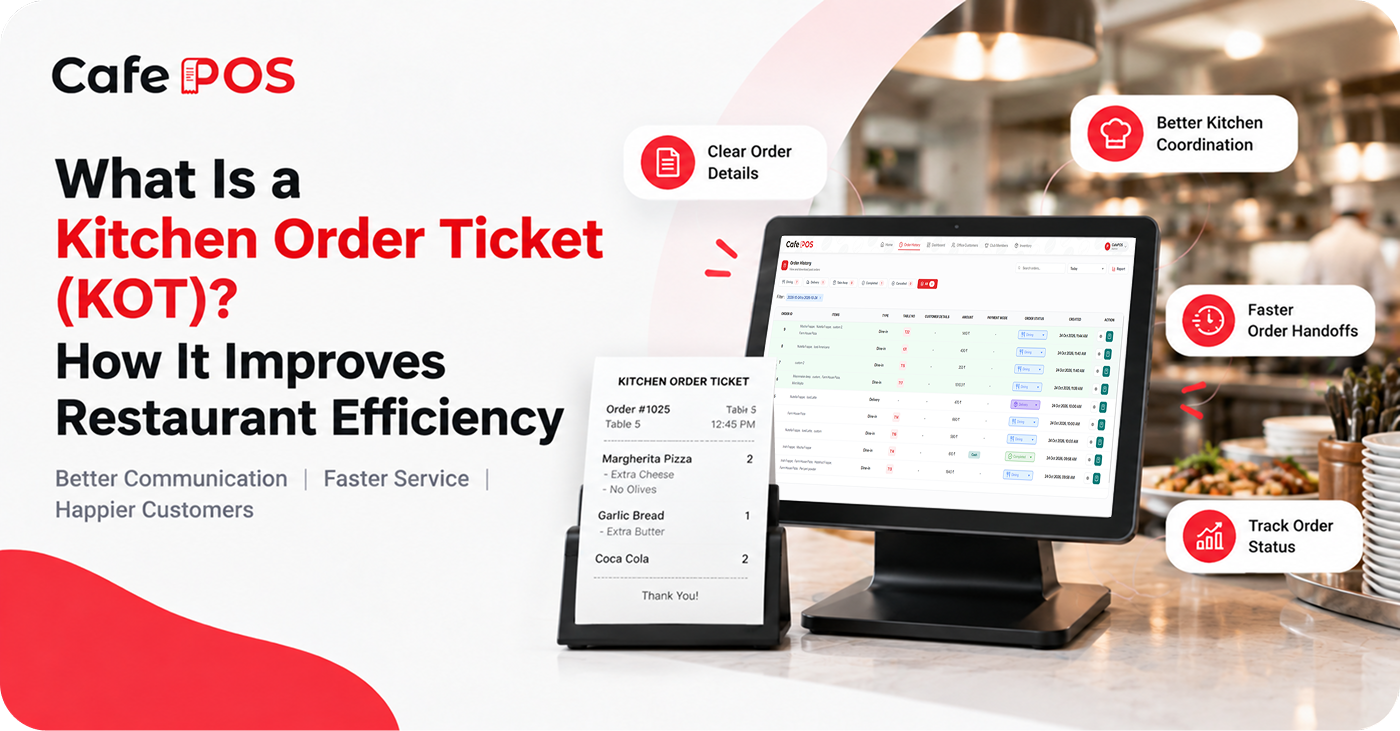
A Kitchen Order Ticket contains the details of food items ordered by a customer. It may include item names, quantities, order numbers, table details, timestamps, modifiers, and special instructions such as ingredient exclusions.
Restaurants traditionally use printed tickets or handwritten notes. Digital ordering systems can transmit order information to a kitchen printer or display, depending on the hardware and software configuration.
KOT vs. Customer Bill
A KOT is primarily a preparation and communication document for the kitchen. A customer bill summarizes charges and payment details. They may refer to the same order, but they serve different purposes and may be generated at different points in the workflow.
How Does the KOT Workflow Work?
- A staff member enters the customer's order into the POS system.
- The order details are sent to the kitchen printer or display, if configured.
- Kitchen staff review items, quantities, and preparation instructions.
- The team prepares the food and updates its status when the system supports status tracking.
- Service staff check the completed order and deliver it to the customer.
- If an order changes or is cancelled, the team follows a clear process to communicate the update to the kitchen.
The exact workflow depends on the restaurant's equipment and software configuration. Staff should know where new tickets appear, how urgent changes are communicated, and how to identify duplicate or cancelled tickets.
Five Benefits of an Organized KOT Process
1. Fewer Communication Mistakes
Clear item names, quantities, and special instructions help the kitchen understand what customers ordered. Consistent menu naming and a standard format for modifiers make tickets easier to scan quickly.
2. Faster Order Handoffs
Digital order communication can reduce the time spent carrying tickets or repeating orders verbally. The biggest benefit comes when the kitchen receives complete information without needing to ask the service team to clarify routine details.
3. Better Team Coordination
Service staff and kitchen employees can follow a consistent process instead of relying on scattered messages. A shared order number or table reference can make it easier to match a dish to the right customer.
4. Clearer Order Tracking
When statuses are available, staff can identify pending, preparing, and completed orders more easily. This helps the team answer customer questions and spot orders that may need attention.
5. Better Customer Service and Less Waste
Accurate tickets help reduce incorrect preparations and the need to remake dishes. This can support a better customer experience while limiting avoidable food waste.
What Should a Good KOT Include?
A useful ticket typically shows a clear order identifier, item names, quantities, table or order type, time, and important preparation notes. Keep instructions concise and use consistent terminology. Avoid relying on ambiguous abbreviations that new employees may not understand.
Tips for Improving Your Kitchen Workflow
- Keep menu names and modifier options consistent across the POS and kitchen.
- Train staff to enter quantities and special instructions accurately.
- Define how changes, cancellations, allergies, and urgent requests are communicated.
- Place printers or displays where kitchen staff can read them without disrupting preparation.
- Review recurring errors and delays to identify where the process needs improvement.
For allergy-related requests, follow the restaurant's food-safety procedures and ensure the relevant team members receive the information. A ticket alone should not replace direct communication when a request needs special attention.
Printed KOT vs. Digital KOT
Printed tickets can be easy to read and may suit kitchens that already use ticket rails, while digital displays can reduce paper use and make status updates easier where supported. Consider kitchen layout, device durability, visibility, connectivity, and the team's preferences before deciding.
Frequently Asked Questions
Is a KOT the same as an invoice?
No. A KOT communicates preparation details to the kitchen, while an invoice or bill records the customer's charges and related transaction details.
Can one order have multiple KOTs?
Some systems can route items to different kitchen stations or produce separate tickets for different preparation areas. Confirm whether your software supports this workflow.
What causes KOT errors?
Common causes include incorrect order entry, unclear modifiers, outdated menu names, printer or connectivity issues, and failure to communicate changes. Standard procedures and regular checks can reduce these issues.
Manage Restaurant Orders With CafePOS
CafePOS supports order management and helps teams organize restaurant orders in one place. Ask the team about the KOT and kitchen coordination features available for your setup.
An organized ordering process can help maintain better communication between the counter, service team, and kitchen.
Ready to simplify your restaurant operations?
Learn more about CafePOS and explore ways to organize your restaurant's daily operations.
Explore CafePOS